
The piles are on site. One lease isn’t settled.
A solar site is built fast once it starts, which is why a late surprise costs so much. REALMS shows which blocks are not clear before the crews arrive.
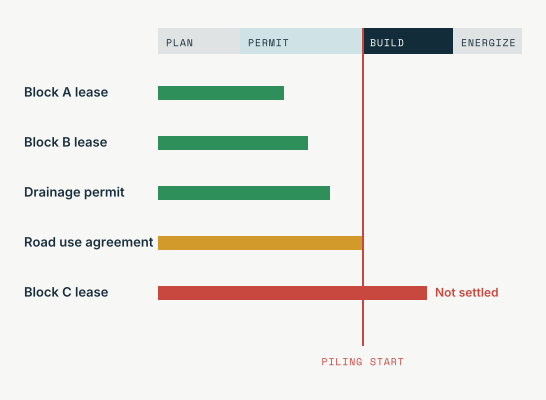
Everyone knew something. Nobody knew all of it.
Illustrative scenario.
Three weeks before
The land lead knows one landowner is still negotiating a setback. It is a note in a file.
Mobilization day
The piling crew starts on schedule. The drawing shows every block as buildable.
A week in
The crew reaches the block and has to skip it. The sequence breaks, and the crew will have to come back.
One late answer, paid for four ways.
The later you find out, the more it costs.
Three weeks early
A phone call and a change of sequence.
The week before
A scramble, and favours called in.
On the day
A crew and its equipment standing by.
After
The window, the relationship, and the argument about whose fault it was.
Schedule
Days lost first, then the window that was behind them.
Money
A crew and its equipment on standby. You know what a day of that costs you.
Reputation
With the contractor, the people whose land it is, and the board.
Approvals
Rushed work is how conditions get missed and approvals get put at risk.
The information existed. It was in different hands.
The people working the approval knew
It was a line in a tracker built for their own team.
Construction had the schedule
Built from planned dates, not from what was cleared on the ground.
Nobody had both
No single record tied the lease to the array blocks it sits under.
Land
Lease setback: still in negotiation.
Regulatory & permitting
Its own tracker, kept up to date.
Environment
Its own tracker, kept up to date.
Engineering & utilities
Its own tracker, kept up to date.
Nothing ties an approval to the ground it holds up.
Planning
Builds the schedule from planned dates.
Construction
Mobilizes against the schedule.
Crews in the field
Find out when they get there.
Same project. Same problem. Known three weeks earlier.
Three weeks before
The lease shows as Forecast Late on the three blocks it sits under.
The decision
The construction manager sequences piling around those blocks from day one.
Mobilization day
The crew works clear ground in order. The blocks are released when the lease is signed.
Land
Lease setback: Forecast Late.
Regulatory & permitting
Its status lands on the location.
Environment
Its status lands on the location.
Engineering & utilities
Its status lands on the location.
Every approval tied to the ground it holds.
Planning
Schedules the ground that is clear.
Construction
Moves crews to work that is ready.
Crews in the field
See what they can work today.
One record. A different answer for each person who is accountable.
Executives
One readiness answer for the site, the reason behind it, and what is forecast to be late.
Construction managers
Which packages can go this week, and what is holding the rest.
Land & permitting leads
Every approval with an owner, a next step and a date, and a record of what was waiting on whom.
Project controls
A forecast date for every location, and a record of when each one was released to construction.
Indigenous & stakeholder relations
Every commitment on the ground it applies to, where crews will see it.
Built to sit inside your environment.
Your cloud or ours
Run REALMS in your own Azure tenant, or have us host it.
Your sign-in
Staff sign in with their Microsoft 365 accounts. No new passwords.
Your documents
Documents stay in your SharePoint.
Your data
A standard PostgreSQL database, open to your reporting tools through SQL or the REALMS API.
Your maps
Your ArcGIS layers on the same map as the project.
See REALMS on your site.
Bring the site plan and the lease you are most worried about. We will show you what it holds.